


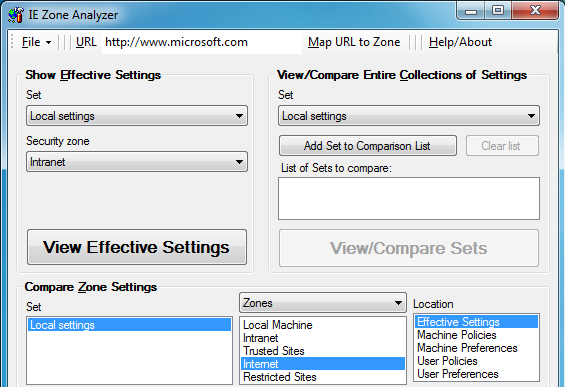
IEZoneAnalyzer is a tiny tool that can help you make more sense of Internet Explorer's many security settings.
As an example, launch the program, choose Internet in the Security Zone box, and click View Effective Settings. You'll immediately see a single list of all your current settings, and how they've been set (user preferences, machine preferences or group policy). And in a click or two all this data can be exported directly to Excel, or saved as a CSV file.
IEZoneAnalyzer also makes it easy to compare security settings. You could save IE's configuration on your laptop, for instance, then compare it with your desktop settings, and IEZoneAnalyzer will immediately highlight any differences. Or, if you save your PC's IE settings now, then you could compare them with that baseline in a few months, and you'll immediately see if the settings have drifted over time.
And you can even compare your current configuration against Microsoft's recommended settings for particular security levels. If you're looking for maximum security, for instance, choose the "High" security template, compare it with your local settings, and IEZoneAnalyzer will again highlight any differences for you.
(The latest release has a few bug fixes, and now properly understands the default settings for IE10 on x64 Windows.)
Verdict:
IEZoneAnalyzer is a very useful tool that can quickly highlight many issues with your IE security settings
Your Comments & Opinion
Discover the web sites that track you and then take back control
Open the current Firefox page in another browser at a click
IE's latest release is faster than ever
Customise hidden IE9 settings in just a few clicks
Play just about any video or audio format using this versatile media player
Open-source password manager goes straight to the top of the class.
The latest stable Chrome Portable includes a number of under-the-hood improvements
The latest stable Chrome Portable includes a number of under-the-hood improvements
Opera's rebooted web browser is starting to come of age